← Back to the Goodie Box
ClickUp
From Signed to Sorted: How We Automated Project Setup in ClickUp
·
7 mins
The gap between a client saying yes and work actually starting is where most businesses quietly lose a week. Here is how we closed it with four ClickUp AI Agents, including one that catches scope creep before it costs money.
TL;DR:
The gap between a client signing and work actually starting was costing us 5–8 hours a week
Generic templates did not fix it, because we never had time to keep them updated
Four ClickUp AI Agents now handle onboarding, project planning and scope checking
The most useful one flags scope creep as it happens, and says so when it is not sure
Around 300 hours a year back, on work that was never really the work
The gap nobody plans for
A client says yes. It should be the best moment in the whole process.
Instead, it is the start of a couple of hours of admin. Someone opens the proposal again to work out what was actually promised. Folders get created in Google Drive, then Dropbox. An invoice gets raised. A ClickUp list gets built from a template that never quite fits. Meeting agendas get written from scratch. Again.
And none of that is the work. That is just getting ready to do the work.
For us it looked like this:
5–8 hours a week lost going back to proposals to find what we were delivering
Post-meeting tasks never properly captured, relying on memory and rough notes
Scope creep going unnoticed until it had already cost us money
Over-delivering on projects because there was no system to catch it
Manual setup across ClickUp, Google Drive, Dropbox and Xero, every single time
Most of the time this is not a people problem. It is a systems problem. Ours included.
What we tried first
Before the agents, we did what most people do. We built generic templates and told ourselves we would tailor them for each client.
The problem was never the templates. It was that we never had time to update them properly, and we never had time to set everything up the way it should have been. So every project started slightly half-configured, and we quietly made up the difference by hand.
Which meant constantly reading back over notes. Rewatching meeting recordings to find the thing someone mentioned in passing. Opening the proposal for the fourth time to check what we had actually committed to.
A template only saves you time if you have time to maintain it. That was the bit we never had.
What we changed
One trigger. Four ClickUp AI Agents. No more re-reading proposals.
The moment a proposal is signed, a single event cascades across every system. A light Zapier connection handles the boring plumbing: marking the deal as won, creating the folders, raising the invoice in Xero. That part is deliberately simple, and it is not the interesting bit.
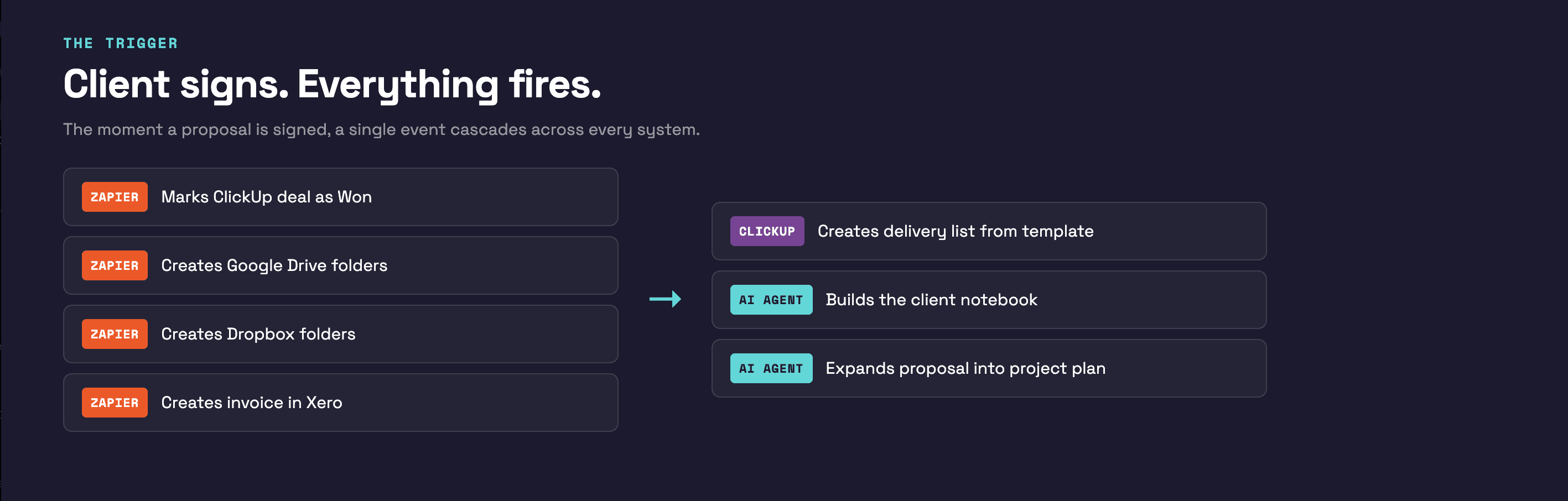
The interesting bit is what happens inside ClickUp next.
Phase one: the project sets itself up
Agent One — Client Onboarding Kickoff
Triggered automatically when the deal is marked as won (by Zapier when the proposal is signed).
Reads the proposal. Finds the signed proposal (link or PDF), and extracts what it needs.
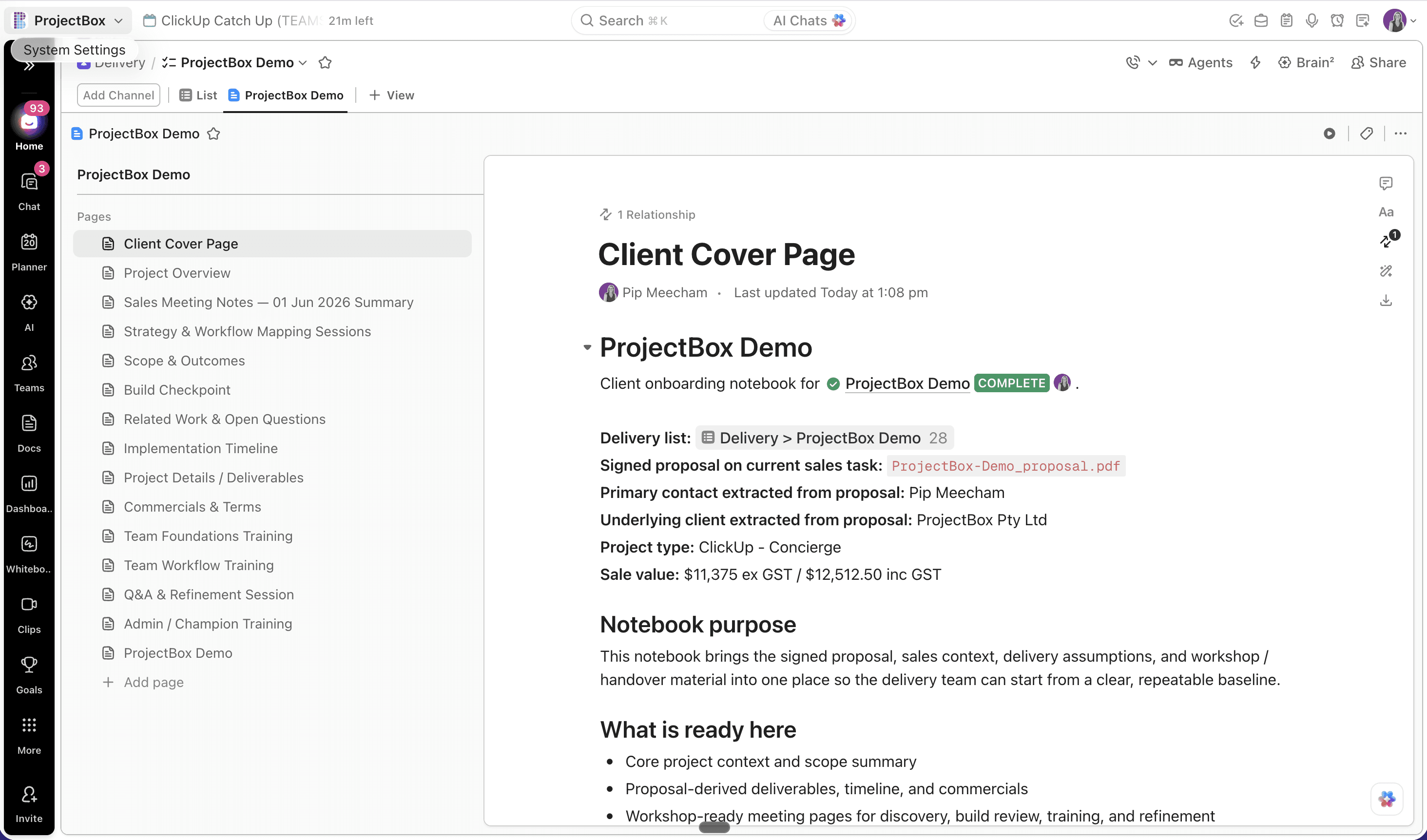
Builds the notebook. Creates a full client doc with project details and deliverables copied verbatim from the proposal. Not paraphrased, verbatim. That detail matters later.
Creates meeting agendas. Individual pages for every session: purpose, timing, talking points, and the questions we need to ask.
Pulls sales context. Copies meeting notes and transcripts from the sales conversation into the delivery notebook, so nothing is lost between the person who sold it and the person delivering it.
Agent Two — Proposal Expander
Triggered automatically by Agent One when it finishes.
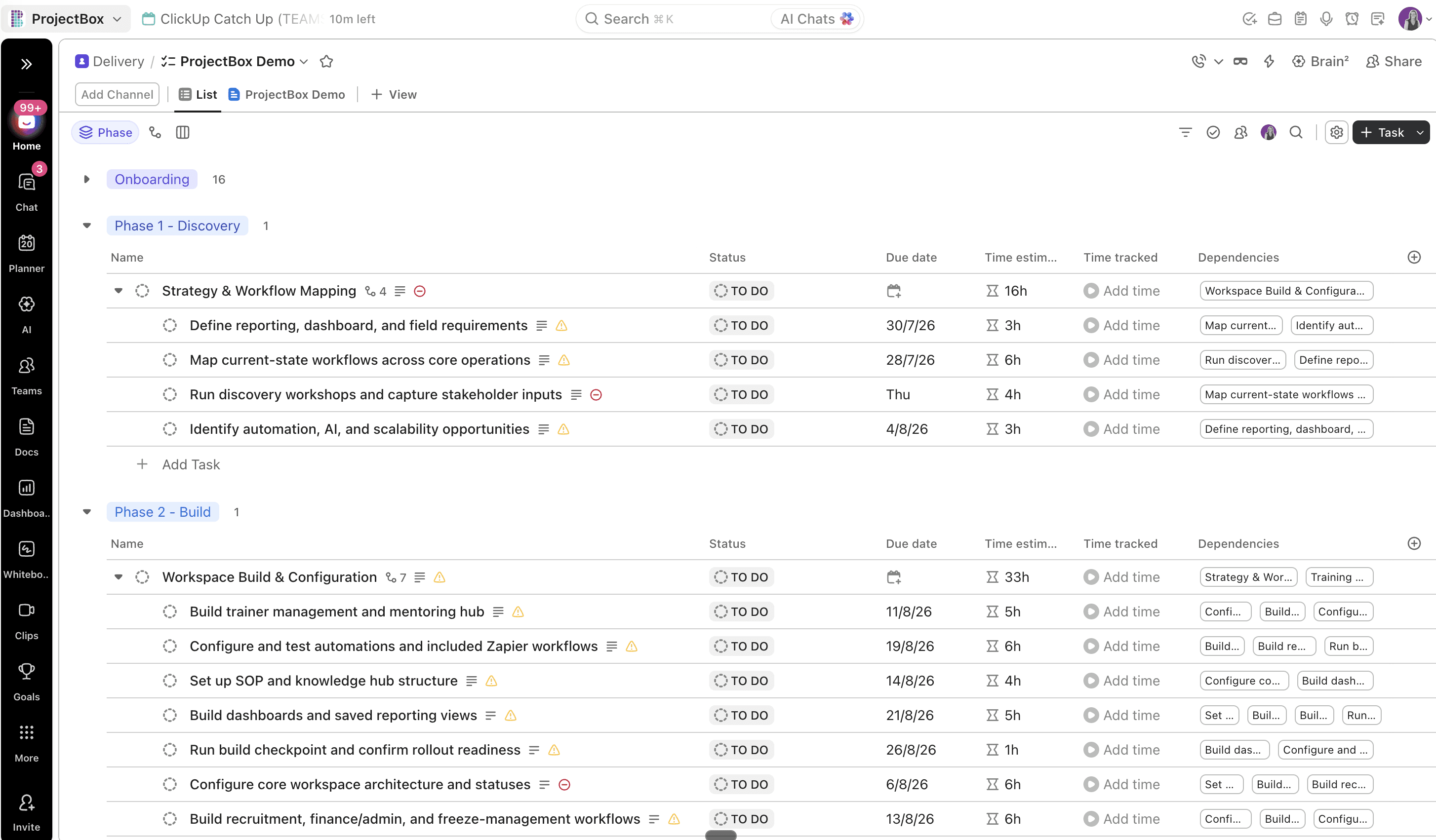
Breaks down scope into stages, deliverables and timelines
Creates tasks and subtasks with dependencies, due dates and time estimates
Generates documentation, including a Scope of Works page and a tailored workflow mapping agenda
Flags open questions, posting a summary of its assumptions and anything that needs a human answer before we kick off
That last one is the part people underestimate. The agent does not guess and quietly move on. It tells us what it was not sure about.

Phase two: keeping it tight
Setting a project up well is one thing. Keeping it accurate while it runs is harder.
Agent Three — Meeting Task Extractor
After a workshop, our AI notetaker captures the session. We message Agent Three, it reads the notes, pulls out the commitments and decisions, and writes them into the client’s delivery list as structured tasks.
That manual trigger is deliberate. Client docs are private by default, and we would rather set this off consciously than have an agent quietly reading everything.
Agent Four — Delivery Scope Guard
This is the one that changed the most for us.
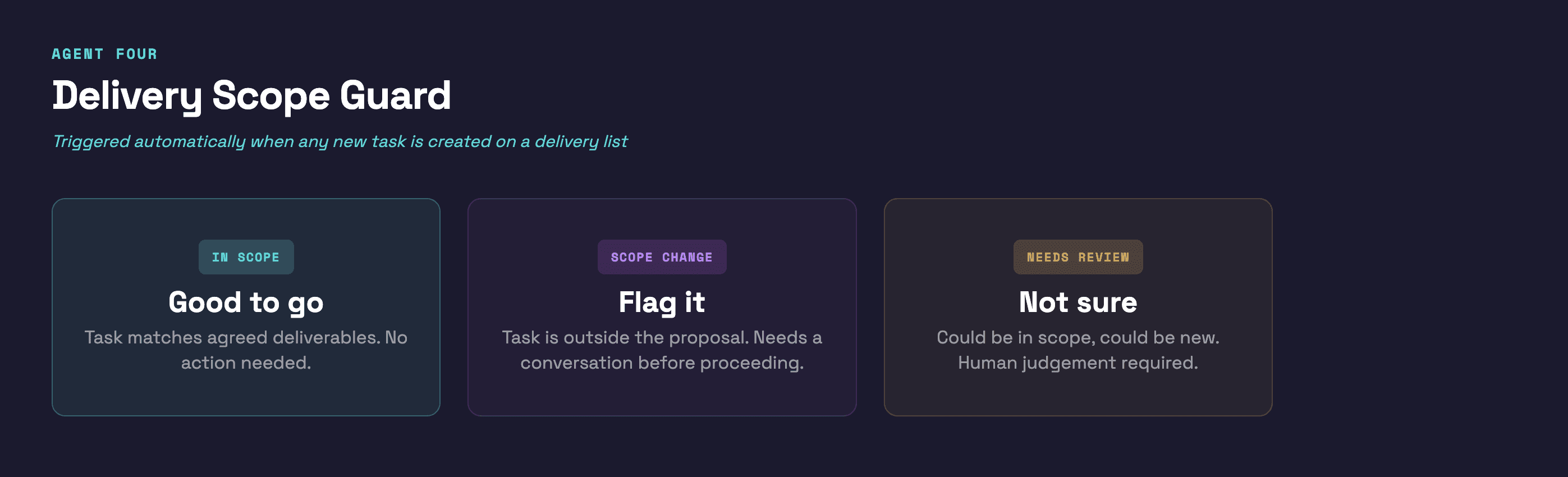
Every new task created on a delivery list passes through it automatically, and it returns one of three answers:
In scope. Matches the agreed deliverables. Carry on.
Scope change. Outside the proposal. Needs a conversation before anyone starts.
Needs review. Could be either. A human decides.
That third option is the whole point.
It would have been easy to build something that always gives a confident yes or no. It would also have been wrong. Scope is genuinely ambiguous sometimes, and a system that pretends otherwise just moves the problem somewhere else. So when it is not sure, it says so, and a person makes the call.
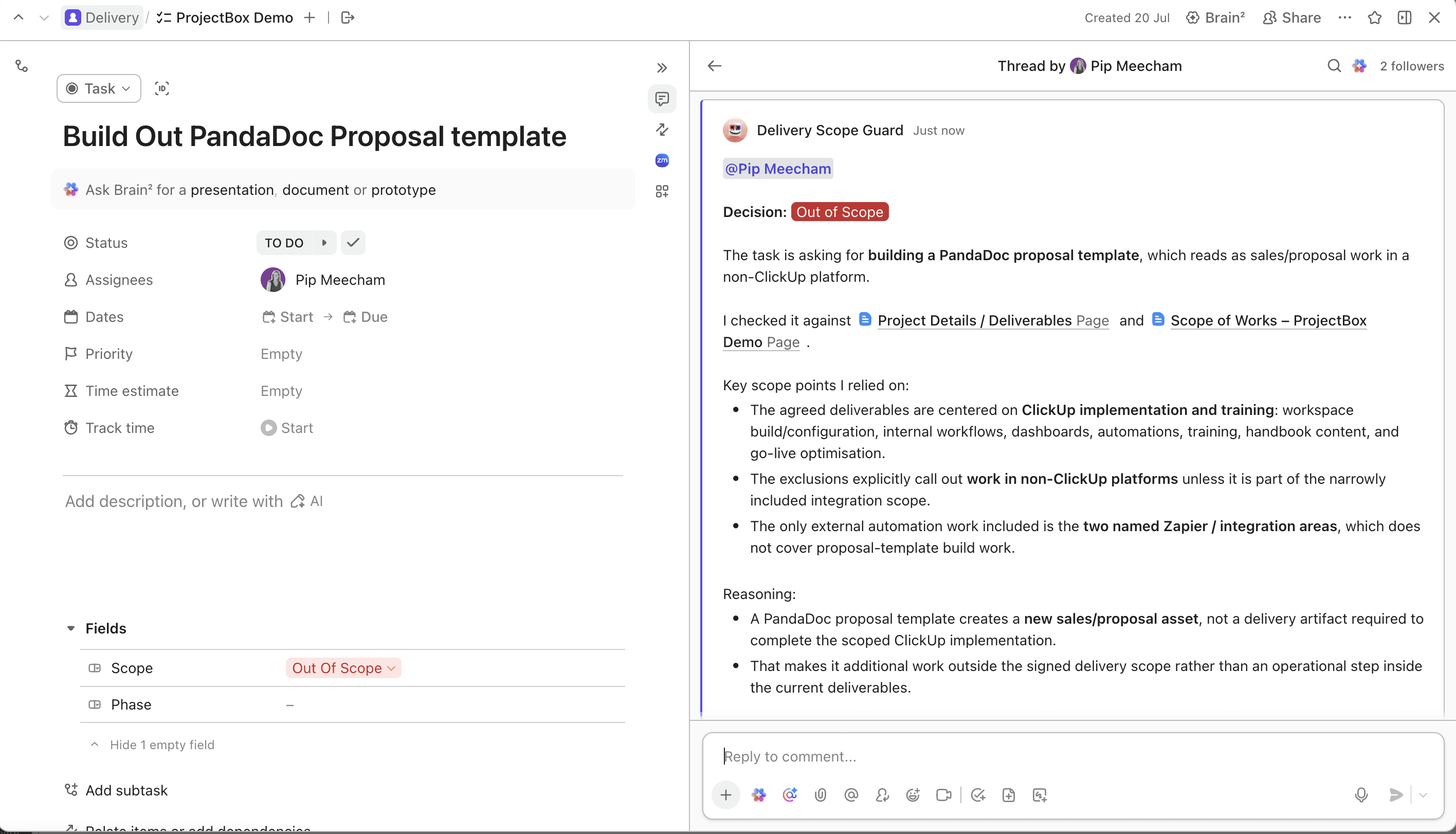
Scope creep used to be invisible until invoice time. Now it gets flagged the moment it appears, with the reasoning and the relevant proposal reference attached.
NEEDS REVIEW EXAMPLE:

OUT OF SCOPE EXAMPLE:
What gets created without anyone doing it
At project start: Google Drive and Dropbox folders, the Xero invoice, a full client notebook containing the proposal scope, meeting agendas with talking points, and a phased task plan with dependencies.
During delivery: tasks extracted from every meeting, scope validation on each new item, clear flags for scope changes, and the reasoning and proposal references attached to each one.
Before and after
Hours re-reading proposals to find deliverables: 5–8 per week → effectively none
Meeting action items captured and tasked: rarely → every time
Scope creep: invisible until it cost us → flagged as it happens
Roughly 300 hours a year back, on work that was never really the work.
What I would do differently
Honestly? I would have done it a lot sooner.
The build itself was not the hard part. The refining was. I had a very clear idea of what I wanted in my head, and most of the time went into explaining that to the agent well enough that it produced exactly that, rather than approximately that.
That is the bit worth knowing if you are considering something similar. The technical setup is quicker than you would think. Getting an agent to produce the thing you can already picture takes iteration, and you should budget time for it.
And I am still refining it as we go. That is not a failure state, that is just how this works.
The honest version
A few things worth saying plainly.
It is not “zero human involvement”. There are zero manual setup steps, which is the bit that used to eat the time. But humans stay in the loop exactly where judgement matters: the open questions Agent Two raises, and anything the Scope Guard is unsure about. A system that removed those would be worse, not better.
It only makes sense at a certain volume. We onboard clients often enough that this paid for itself quickly. If you take on a handful of projects a year, a good template and a checklist will serve you better, and we would tell you that.
Would this work for you?
We built this for ourselves first, which is the only reason we can talk about it honestly.
If your ClickUp workspace is already in decent shape and you are curious what agents could take off your plate, that is a conversation worth having.
If you are not sure your workspace is solid enough to build on yet, that is usually the real answer, and it is worth checking first.
Take the ClickUp Health Check — 15 questions, a few minutes, and a clear picture of where your workspace actually stands.
