← Back to the Goodie Box
I Built My Own Capacity Planner With AI (Because Nothing on the Market Fit)
·
7 mins
Off-the-shelf capacity planners assume you work the same hours every week. As a solo consultant with an alternating parenting schedule, I used ClickUp AI and Zite to build a visual 13-week planner that answers one question: can I take this on?

I have an alternating parenting schedule. One week I work 8 to 10 hours a day. The next, 5.5. Throw in school holidays where those short weeks shrink even further, and figuring out whether I can actually take on new work becomes a genuinely hard question to answer.
I went looking for a tool that could help. What I found was a lot of software built for teams of 20+, not solo consultants juggling parental calendars.
Key Takeaways
Most capacity planning tools assume a consistent work week. If yours changes week to week, you're on your own.
You don't need enterprise resource planning. You need a simple answer to "can I take this on?"
AI is genuinely useful for building custom tools that match how you actually work, not how software companies think you should.
Start with a proof of concept, then move to a proper platform. ClickUp's AI artifacts let you prototype fast. Zite gives you persistence.
The best capacity system is one you'll actually use. Five minutes a week or it gathers dust.
You can embed custom planners directly into ClickUp so everything lives where you already work.
Why Off-the-Shelf Capacity Tools Didn't Work
There are capacity planning tools out there. Plenty of them. Resource Guru, Float, Toggl Plan, Harvest Forecast. They're good at what they do.
The problem is what they do assumes a consistent work week.
Every tool I tried wanted me to set a weekly capacity: 40 hours, 35 hours, whatever your number is. Then it calculates availability based on that single number, week after week.
My reality looks nothing like that. One week I have 42.5 hours available. The next, 27.5. School holiday weeks might be 20. A week where I have events or other personal things going on could be 15. There's no single number that describes my capacity, and there's no setting in these tools for "it depends on which week."
Some tools let you set exceptions for specific dates. That helps with holidays, but it doesn't help with an alternating pattern that runs indefinitely. I don't want to manually override every second week for the rest of the year.
The other issue: complexity. Most of these tools want you to log timesheets, assign resources across projects, generate utilisation reports. I'm one person. I don't need a dashboard. I need to open something, glance at it, and know whether I can say yes to the client on the phone.
What I Actually Needed
Two questions. That's it.
Can I take this on?
If not, when can I fit it in?
I needed a planner that could show me 13 weeks ahead (a rolling quarter), with each week reflecting my actual available hours for that specific week. Kid week, full week, school holidays, leave. All accounted for automatically.
I also needed it broken down by commitment type: overhead (admin, sales, marketing), retainer clients (recurring hours each week), and project work (the hours I'm actually selling). The leftover is what I have free. When that number goes negative, I've overcommitted.
And the whole thing had to take less than five minutes a week to update. Anything more than that and I know myself well enough to admit I'd stop using it by week three.
How I Built It With AI (And Why I Didn't Stop at the First Version)
I didn't learn to code. I didn't hire a developer. I started where I already was: inside ClickUp, talking to Brain.
The first version was a ClickUp artifact. If you haven't used these, artifacts are interactive mini-apps that ClickUp's AI builds for you right inside a chat conversation. I described what I needed: alternating parenting schedule, three types of work commitments, a 13-week rolling window, and the two questions I needed answered. Within minutes I had a working visual planner sitting right there in my chat.
It was brilliant as a proof of concept. I could see the layout, test the logic, tweak the calculations, and figure out what was missing. The problem? Artifacts don't save. They're designed for exploration, not daily use. Every time I came back, I'd be starting from scratch. There's no database behind them, no way to persist your data between sessions, no way to update client hours on Monday and have them still be there on Tuesday. For a quick prototype or a "let me see if this idea even works" moment, they're perfect. For something I need to rely on every week, they're not the right home (yet!).
But here's where it gets clever. Once I had the proof of concept working and I knew exactly what the planner needed to do, ClickUp AI gave me the full prompt to reproduce the artifact in another tool. Not vague instructions. The actual, detailed prompt: data model, calculations, interface layout, the lot. I took that prompt straight into Zite, the same platform where our diagnostic hub and tools already live.
The whole process, from first ClickUp artifact to working Zite app, took about 90 minutes. Most of that time went into refining what I actually wanted during the artifact stage, not the technical build. Once I had the prompt, Zite did the heavy lifting.
The key was being specific about the problem, not the solution. I didn't tell the AI "build me a capacity planner." I described my exact situation and let it handle the architecture. I handled the "does this actually match my workflow?" testing. And when the prototype outgrew its home, I had everything I needed to move it somewhere permanent.
This is what I mean when I talk about AI extending your thinking. It didn't just build the thing. It helped me figure out what the thing needed to be, then packaged up everything I'd learned so I could take it somewhere it would actually last.
What the Planner Actually Does
The main view is a 13-week timeline. Each row represents a week. You can see at a glance:
Week type (Full, Kid, or Holiday) with hours adjusted automatically
Overhead (grey bar): admin, sales calls, marketing time
Retainer commitments (purple bar): recurring client hours
Project work (aqua bar): implementation and consulting hours
Available hours (green number on the right): what's left to sell
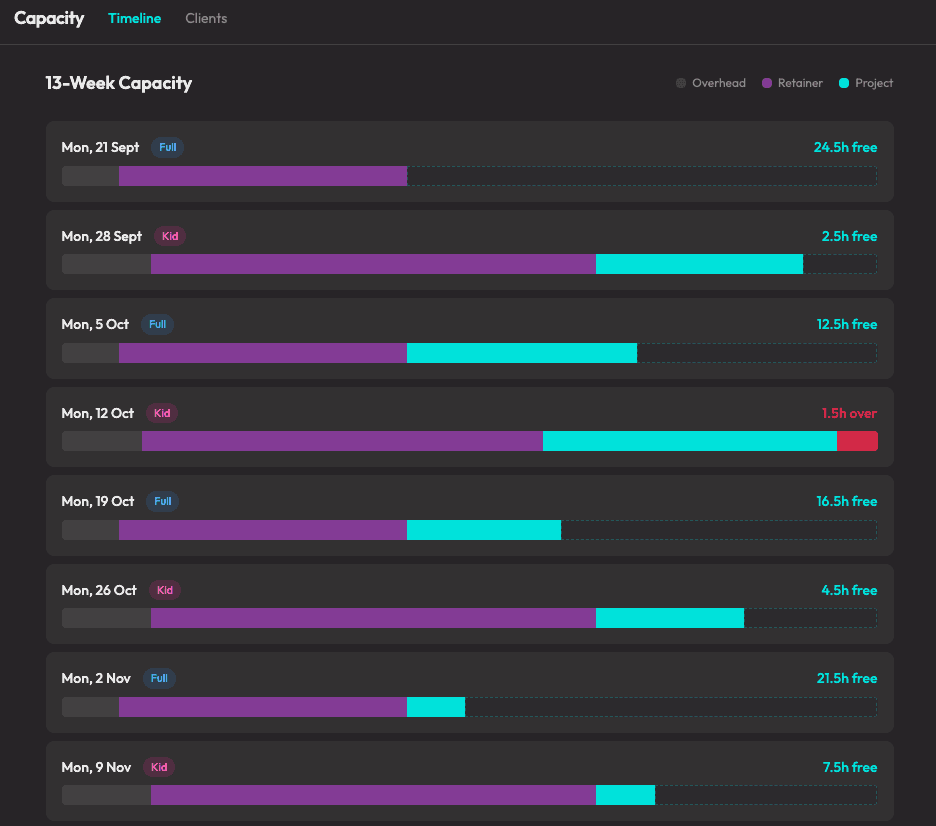
When the number on the right flips red, that week is overcommitted. That "1.5h over" on a school holiday week? That's the kind of thing I used to discover when it was already too late to fix.
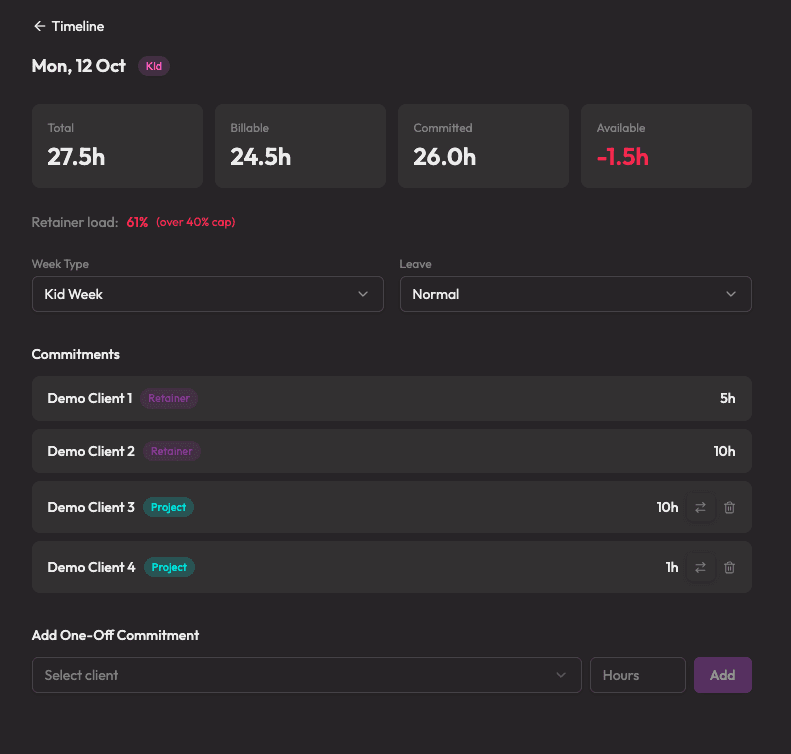
But it's not just a chart. I can drill into any individual week and see exactly what's booked. I can add a one-off client request, mark leave days, or shift hours between weeks when timelines change. If a client calls asking "can you fit us in next month?", I have the answer in ten seconds.
Connecting It to ClickUp
I embedded the Zite planner directly into ClickUp using an embed view. So it sits alongside my actual project work, client list, and task board. No tab switching, no separate login. Everything I need to manage my business lives in one place.
Then I took it a step further: I built a ClickUP Super Agent inside that runs every Monday morning. It checks what's changed in my project list, pulls my Google Calendar for the week (to account for meetings eating into capacity), and sends me a digest of exactly what needs updating in the planner.
The Monday message looks something like:
This week: Kid week, 27.5h total
New tasks added: Client X implementation, 6h estimated
Calendar: 3 client meetings, 4.5h blocked
Retainer check: Client Y has no tasks this week (keep 5h or release?)
I open the planner (in ClickUp), work through the checklist, and I'm done. Five minutes. Every Monday. The rest of the week, I just glance at the timeline when I need to answer a scheduling question.
Why This Matters Beyond My Schedule
This post isn't really about capacity planning. It's about building tools that match how you actually work, instead of reshaping your workflow to fit someone else's software.
If you're a solo consultant, freelancer, or small team operator, your schedule probably doesn't look like the one software companies designed for. Maybe you work compressed weeks. Maybe you have seasonal variation. Maybe you're splitting time between two businesses. Whatever your version of "it's complicated" is, the principle holds.
The best tool isn't the most powerful one. It's the one you'll actually use. And if the off-the-shelf options don't fit, building something custom is more accessible than it's ever been. AI won't replace your thinking, but it will extend it into places you couldn't reach alone.
You don't need to be technical. You need to be specific about your problem.
Frequently Asked Questions
How long did it take to build the capacity planner?
About 90 minutesfrom first prompt to working version. The ClickUp artifact proof of concept came together in minutes. Most of the remaining time went into refining what I actually wanted, not the technical build. Once I had the final prompt, Zite generated the persistent app quickly.
Why not just keep it as a ClickUp artifact?
Artifacts are fantastic for prototyping. They let you test ideas fast without leaving ClickUp. But they don't save data between sessions. There's no database, no persistence. For a capacity planner I need to update every Monday and rely on all week, I needed something that would remember my numbers. The artifact was the design phase. Zite is the production version.
Can I build something similar without coding experience?
Yes. That's exactly what I did. Start with a ClickUp artifact to get the concept right, then take the prompt to Zite (or a similar platform) for the persistent version. The skill you need isn't coding. It's being able to clearly describe your problem and your workflow.
Why not just use a spreadsheet?
You absolutely could. A spreadsheet would handle the maths. But it wouldn't give you the drill-down views, the visual timeline (without a lot of fiddling) and I hate looking at spreadsheets! The difference is usability: something you'll open every Monday vs something that lives in a forgotten tab.
Does this work for teams, or just solo operators?
The version I built is for one person with variable capacity. But the same approach scales. You could build a version for a small team where each person has different working patterns. The point is that the tool adapts to you, not the other way around.
What is Zite?
Zite is a platform that lets you build custom business apps with AI. It has a real database underneath, supports integrations, and lets you create interfaces without writing code. Think of it as a more powerful alternative to Airtable, with AI doing the heavy lifting on app creation.
If This Sounds Familiar
If you're reading this thinking "I need something like that but for my version of the problem," that's literally what we do at ProjectBox. We design systems that match how you actually work, not how the software manual says you should.
Sometimes that's a ClickUp implementation. Sometimes it's a custom tool. Sometimes it's connecting three things you already have so they stop fighting each other.
Book a free meet and greet and tell us what's not working. We'll tell you honestly whether we can help.
